

One of my social posts came out as a tiny picture in the corner of a huge blank image. The slide was meant to be 1080 pixels square. The saved file was 5160 pixels wide and 12340 pixels tall.
In Figma, the tool I use to lay out posts, the design looked right. The saved file put the design in the wrong place. I had to follow the work beyond the design tool to see what had happened.
Keeping the person and clothes consistent

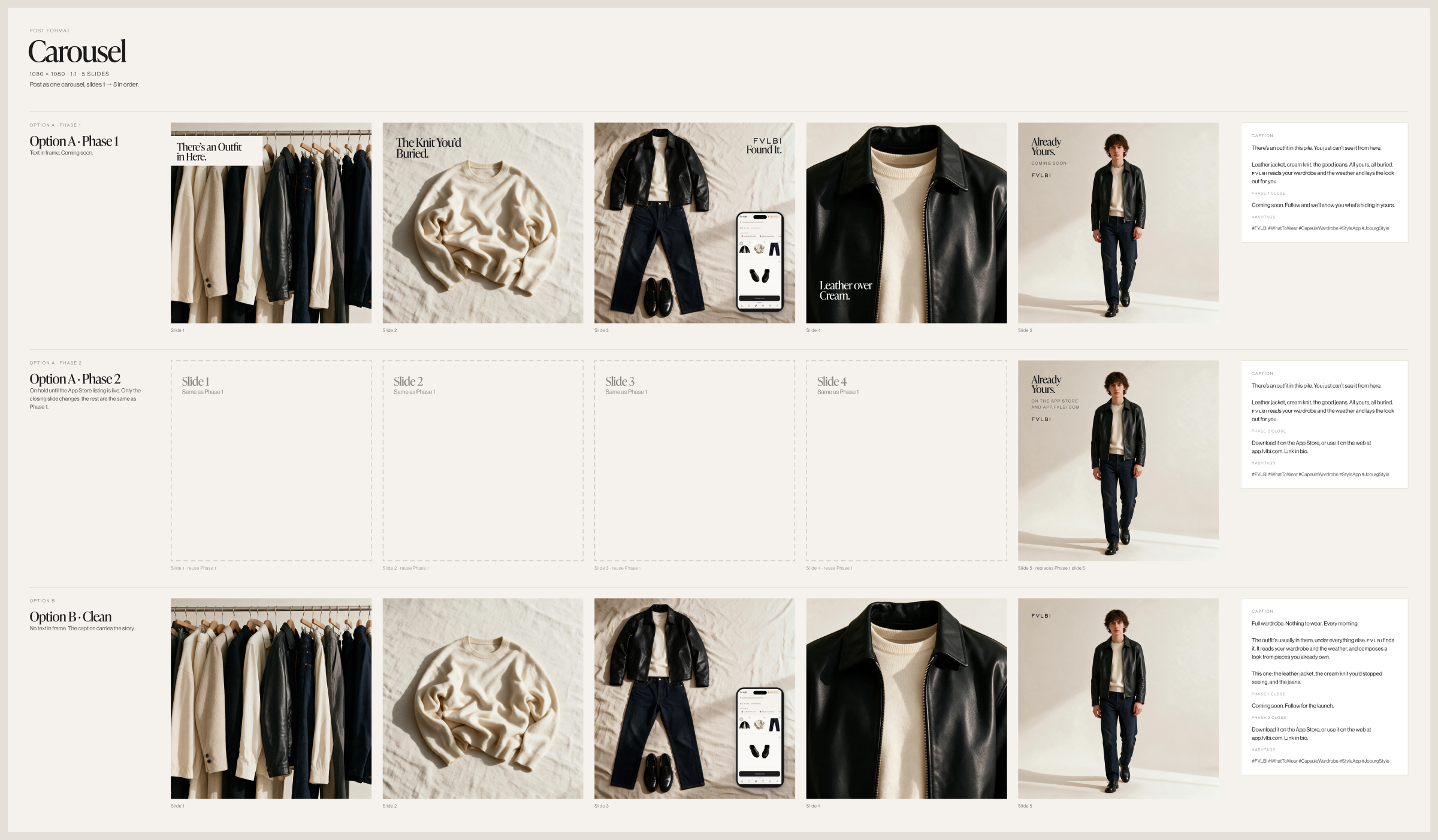
The post was part of a wardrobe campaign about an outfit hidden among clothes someone already owned. It followed a cream knit, leather jacket and jeans from the wardrobe to a person dressed to leave. I used Weave, an AI image tool, to make the scenes.
The five-slide version began at a crowded rail, then showed the knit on its own. The outfit laid out came next, followed by a close view of the collar and zip. The final image showed the person heading out. Under the leather jacket, much less of the cream knit showed than in the earlier view on its own.
In the Weave setup I used, an initial image established the person for the later scenes. Starting the full run again could produce a new person. I kept scenes from the same run together, with the instruction to rerun a single scene without making the initial image again if it needed another pass.
A close-up could linger on the collar and zip because the longer sequence had room for it. In the three-frame Story, I used a shorter route through the idea, from the pile to the phone, then to the person dressed to leave. I also had a single portrait image for the grid.
The Story filled a tall phone screen, while the carousel used square slides. I laid out the scenes for each shape. The words and crops still needed a check at phone size, where the clothing detail would be much smaller than in the design file.
Words and real screens in Figma
I brought the images into Figma and added the headlines as editable text. I could work on the line breaks, fonts and position while leaving the scene in place, using the fonts chosen for the campaign. A headline on the knit slide shared space with a small piece of clothing, so I could move the type around the image as part of the layout.
Some frames included a phone showing an outfit in the app. I placed real screens from the web app into those phone frames. Each campaign’s screen showed its own clothes and Johannesburg weather, taken from a bank of app screens. AI supplied the scene around it.
The phone shape was part of the layout, with a web screen fitted into it. It wasn’t a screenshot of a native phone app.
Nine files with too much space
The failed batch contained nine designs saved at once from Figma desktop. Each PNG image had a large transparent area around the post. The square slide occupied one corner of a canvas more than eleven times its height. Against a white background, much of that clear space simply looked blank.
The checks covered the design frames and the export settings. The frames kept their contents inside their edges, nothing extended outside them, and the settings called for PNG images at their own size. A separate route used Figma’s export tool through code to save the square design. That produced a 1080-by-1080 image.
What the saved files settled
I never found why the batch gained that space, and the campaign went out anyway. That still sits a little oddly with me, because the sequence had been planned down to which slide got the collar and zip, and the last step of making it was a fault I could describe but couldn’t explain.
It didn’t need explaining to be worked around. A correct square came out of the other export route, the final folder already held files at the right size, and those were what the post was made from.
The question of what Figma desktop did with nine frames is still open. It belongs to the tool, and I can chase it later with one frame at a time, which is how I’d start any new export now.
The post belonged to its day. The person, the knit and the words went out at the size they were designed for, and the design file that looked right was, in the end, right. What it couldn’t show me was the file, and the file is the version anyone else sees.